
How to Find and Remove Hidden Watermarks in AI Text (Claude, ChatGPT, and More)
Ever pasted AI-generated text into a document and had a nagging feeling something wasn't quite right? Maybe the spacing looked a little off, or a phrase felt a bit too stiff. That's often a sign of hidden watermarks left behind by large language models like Claude, ChatGPT, and others. They're invisible to the eye, but detectors and cleanup tools can spot them instantly.
In this guide, we'll walk through what these watermarks are, why they show up, how they affect your writing, and how to find and remove them—including any left by Claude or ChatGPT. Then we'll point you to a simple humanizing tool that takes things a step further.
What Are LLM Watermarks?
A text watermark is basically a hidden fingerprint. Unlike a logo on an image, you can't see it directly. It might be a zero-width space, a directional mark, a non-standard space, or even a pattern in the wording. Most modern models can embed these—sometimes on purpose, sometimes as a side effect of how they generate text.
While companies don't usually share their exact methods, the resulting text often carries clues that the right tools can pick up.
Why do these watermarks exist? Developers use them for a few reasons: tracing content, reducing misuse, meeting transparency rules, and studying how models are used. But for regular users—students, writers, marketers, business owners—those hidden markers can trigger AI detectors, hurt SEO, and make your writing feel less authentic.
Why Do LLMs Like Claude AI and ChatGPT Use Watermarks?
Both Claude AI (from Anthropic) and ChatGPT (from OpenAI) have talked about watermarking and other ways to track where text comes from. The reasons are pretty practical:
- Provenance and accountability: Watermarks make it easier to trace where a piece of text came from.
- Misuse prevention: Detectable AI text helps platforms cut down on spam, misinformation, and cheating.
- Regulatory compliance: Some places require transparency when AI is used to generate content.
- Model evaluation: Researchers can track how models are used in practice.
Even when a model doesn't add visible watermarks, its token choices can leave statistical patterns that detectors recognize. So a good cleanup tool should catch both hidden characters and AI-sounding phrasing.
How Watermarks Hurt Your Content
Let's say you use Claude or ChatGPT to draft an email, a blog post, or a paper. You edit a few words and assume you're in the clear. But hidden characters—like zero-width spaces or word joiners—can still be sitting in your text. They don't show up on screen, but they can trigger AI detectors or cause issues with your CMS.
Here are some specific problems watermarks can cause:
- AI detection flags: Tools like GPTZero and Originality.ai look for these markers and statistical anomalies.
- SEO penalties: Google wants original, helpful content; hidden signals can suggest automation and hurt rankings.
- Academic integrity issues: Even paraphrased text can be traced back through invisible markers.
- Trust and credibility: Readers may sense the writing feels off, even if they can't explain why.
The fix isn't to ignore it. You need to detect and remove those watermarks before you publish or submit your work.
Meet the Text Watermark Detector & Remover
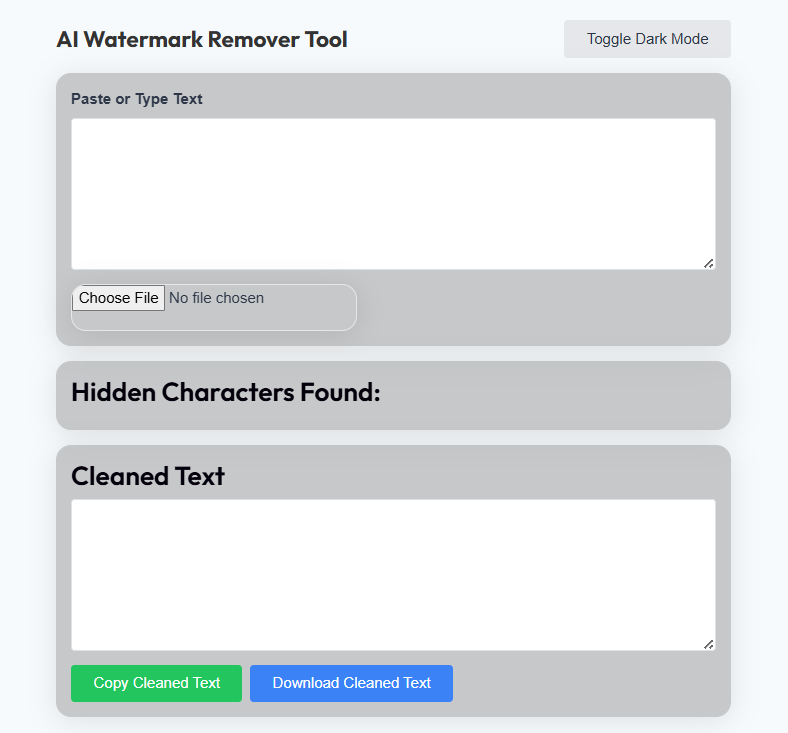
Luckily, there's a free browser-based tool built for exactly this job. Instead of giving you a vague probability score like some detectors, it digs into the actual Unicode characters in your text. It shows you which characters are suspicious, where they're located, and how to clean them up.
Key capabilities include:
- Detects watermarks from Claude AI, ChatGPT, and other LLMs.
- Flags hidden Unicode characters like zero-width spaces, control marks, and directional formatting.
- Highlights non-standard spaces such as no-break, thin, and hair spaces.
- Identifies common AI-style phrases that often show up in generated text.
- Gives you a risk score from 0 to 100 based on what it finds.
- Cleans the text automatically—removes invisible characters, normalizes spaces, and can replace robotic phrasing.
Since it runs entirely in your browser, your text never leaves your device, which is a nice privacy bonus.
How the Tool Detects LLM Watermarks
We won't share every detail of the detection algorithm, but here are the core ideas that make it effective.
1. Unicode Code Point Analysis
Every character has a Unicode code point. The tool scans yours and flags anything unusual: control characters, format characters, invisible spaces, and visible non-ASCII symbols that might be part of a pattern.
2. Pattern Recognition
It also looks for clusters of invisible characters or repeated control sequences—both strong hints of encoded watermark data. When several hidden characters appear in a row, the risk score jumps.
3. AI Phrase Matching
Beyond Unicode, the tool keeps a list of phrases that tend to appear in machine-generated text—things like "furthermore," "moreover," "it is worth noting," or "delve into." These aren't watermarks in the strict sense, but they can make detectors suspicious.
4. Risk Scoring
Each flag adds to a cumulative risk score. Invisible characters count heavily; visible Unicode and AI phrases add a smaller amount. The final percentage is color-coded so you can see at a glance whether you're in the clear.
Common Watermark Characters You Should Know
Here are some of the hidden characters most often found in LLM watermarks:
| Unicode | Name | Type | Why It Matters |
|---|---|---|---|
| U+200B | Zero Width Space | Format (Cf) | Extremely common in watermarks; invisible but detectable |
| U+200C | Zero Width Non-Joiner | Format (Cf) | Can be used to break words invisibly |
| U+200D | Zero Width Joiner | Format (Cf) | Often found in emoji sequences, also in watermarks |
| U+2060 | Word Joiner | Format (Cf) | Prevents line breaks; used for invisible tagging |
| U+FEFF | Zero Width No-Break Space / BOM | Format (Cf) | Classic watermark carrier, especially at text start |
| U+00A0 | No-Break Space | Separator (Zs) | Looks like a normal space but isn't; common in copied AI text |
| U+2009 | Thin Space | Separator (Zs) | Narrower than a normal space; often used for subtle spacing |
| U+202E | Right-to-Left Override | Format (Cf) | Can reverse text direction; dangerous and suspicious |
These characters are invisible to the human eye but easy for the tool to detect. When you analyze text, it will highlight each one, show its Unicode code point, and explain how to clean it.
How to Use the Tool to Detect and Remove Claude AI / ChatGPT Watermarks
Using the tool is straightforward:
- Paste your text into the input area.
- Click "Analyze." The tool scans every character and shows a risk score, findings, and a detailed breakdown.
- Review the results. You'll see exactly which characters are suspicious and where.
- Click "Clean." It removes invisible watermarks, normalizes whitespace, and optionally replaces robotic phrasing.
- Copy the cleaned text and use it.
You can also customize the cleaning: strict Unicode removal, AI phrase replacement, and whitespace normalization are all optional.
Why Cleaning Isn't Enough: The Humanize Step
Cleaning out the hidden characters is essential, but it's only part of the job. Even with all the invisible stuff gone, the sentence structure and word choices can still feel AI-generated. That's where a dedicated humanizing tool makes a big difference.
✨ Make Your AI Text Sound Human
Once you've cleaned up the watermarks, run your draft through WriteHuman. It rephrases the content so it sounds more natural, lowers the odds of tripping AI detectors, and keeps your own voice intact. It works with text from Claude AI, ChatGPT, and just about any other model.
Humanize Now →Why humanize? Because search engines favor original, helpful content. If your draft still has that AI-typical rhythm, it may not rank well even after the hidden markers are gone. Humanizing makes the writing more engaging and easier to trust.
Key Features and Benefits at a Glance
- Detects watermarks from Claude AI, ChatGPT, and other major models.
- Spots hidden Unicode characters, zero-width spaces, and odd spacing.
- Gives you a clear risk score instead of a vague "maybe."
- Shows exactly where suspicious characters sit in your text.
- Processes everything locally—your writing stays on your device.
- Includes optional AI phrase replacement to remove robotic transitions.
- Works with emails, essays, blog posts, product copy, and more.
- Free and unlimited, no signup required.
Why Watermark Detection Matters
If you publish anything online—a blog post, product description, or social caption—hidden AI watermarks can work against you. Google's algorithms are getting better at spotting machine-generated content, and these markers are one of the signals they may use.
Running your text through a watermark remover before you publish lowers that risk. Follow it with a pass through WriteHuman, and you've got a solid workflow for producing original, higher-ranking content.
Frequently Asked Questions
Does this tool work on text from Claude AI?
Yes. It's designed to catch watermarks and hidden Unicode characters from all major LLMs, including Claude.
Can it detect ChatGPT watermarks?
Definitely. OpenAI has experimented with watermarking, and even when no explicit watermark is there, the tool's phrase detection and Unicode checks can flag typical AI patterns.
Is the tool free?
Yes. The watermark detector and remover is completely free. No account needed, and your text never leaves your device.
Will removing watermarks make my text 100% undetectable?
No single tool can promise that. Removing watermarks is a strong first step, but for best results you should also humanize the text. WriteHuman is a good option for that.
Final Thoughts
AI-generated writing isn't going anywhere, so knowing how to clean it up is more important than ever. Whether you're a student, a marketer, or just someone who wants their writing to feel authentic, understanding and removing watermarks is a valuable skill.
The Text Watermark Detector & Remover gives you a clear view of what's hiding in your text—free and without uploading anything. Pair it with WriteHuman to make your draft sound like you wrote it from scratch.
Start detecting and removing Claude AI, ChatGPT, and all other LLM watermarks today.
✨ Ready to Clean and Humanize?
Scan your text with the watermark detector, then run it through WriteHuman to polish it into something that sounds genuinely human.
Humanize Now →Disclaimer
This tool and the information here are meant for legitimate uses. Don't use watermark removal to deceive, plagiarize, or break any platform's terms. Make sure you have the right to use and modify any text you process. The creators and the linked service aren't responsible for misuse—you're responsible for following the rules.


