

QR Code Generator

📤 Share the Free QR Code Generator with others:
Welcome to Our QR Code Generator
Create professional, customizable QR codes in seconds — 100% free, no registration, and no hidden fees.
What is a QR Code?
A QR code (short for Quick Response Code) is a type of two-dimensional barcode that stores information in a grid of black and white squares. Unlike traditional barcodes that only store data horizontally, QR codes store data both vertically and horizontally, allowing them to hold much more information.
When scanned with a smartphone or tablet camera, QR codes can instantly open websites, share contact details, connect to Wi-Fi, display text, or even make payments. They are called "Quick Response" because they are designed to be read quickly and efficiently.
Our Free QR Code Generator makes it easy for anyone — from small business owners to educators and marketers — to create high-quality QR codes in seconds.
History of QR Codes
QR codes were invented in 1994 by a Japanese company called Denso Wave, a subsidiary of Toyota. The original purpose was to track vehicle parts during manufacturing. Traditional barcodes couldn't store enough data or be scanned quickly enough, so Denso Wave developed the QR code to solve this problem.
At the time, QR codes were revolutionary because they could be scanned from any direction (360 degrees) and contained built-in error correction, meaning they could still be read even if partially damaged.
For many years, QR codes were mostly used in industrial and logistics settings. But in the 2010s, with the rise of smartphones and mobile internet, QR codes began appearing in everyday life — from restaurant menus to event tickets and digital business cards.
The global pandemic in 2020 gave QR codes a massive boost. As people looked for contactless ways to interact, businesses turned to QR codes for menus, check-ins, and payments. Today, QR codes are a common part of daily life in many countries.
Our free QR code generator honors this legacy by making it easy for anyone to create powerful, scannable codes — just like the experts use.
How QR Codes Work
QR codes may look like random patterns of black and white squares, but every part has a purpose. Here's how they work:
- Data Encoding: Information like URLs, text, or phone numbers is converted into binary code (0s and 1s), which is then mapped into the grid of squares.
- Finder Patterns: The three large squares in the corners help scanners detect the code's orientation and size.
- Alignment Patterns: Smaller squares inside the code help scanners read it correctly, even if it's skewed or partially obscured.
- Timing Patterns: Lines that run between the finder patterns help the scanner determine the size of each module (square).
- Error Correction: QR codes use advanced algorithms to recover data even if the code is damaged, dirty, or partially covered. There are four levels: L (7%), M (15%), Q (25%), and H (30%).
When you scan a QR code with your phone, the camera captures the image, and software decodes the pattern to retrieve the original data. This all happens in less than a second.
Our QR code generator uses high-level error correction by default, so your codes remain scannable even in less-than-ideal conditions.
Types of QR Codes
Not all QR codes are the same. There are several types and variations, each suited for different purposes:
Static vs. Dynamic QR Codes
Static QR codes contain fixed data that cannot be changed after creation. Once printed, the information is permanent. These are perfect for simple uses like linking to a website or sharing a phone number.
Dynamic QR codes use a short URL that redirects to the final destination. This means you can change the target URL anytime without reprinting the code. Dynamic codes often include tracking features to monitor scans.
Our tool creates static QR codes, which are ideal for privacy-focused users who want full control over their data without relying on third-party servers.
Model 1 vs. Model 2 QR Codes
Model 1 was the original version with limited capacity and no alignment patterns. It's rarely used today.
Model 2 is the standard version used worldwide. It includes alignment patterns and higher error correction, making it more reliable. Our generator uses Model 2 by default.
Micro QR Codes
These are smaller versions of QR codes designed for limited space, like on electronic components or small product labels. They hold less data but are still scannable.
Other 2D Codes (For Comparison)
While QR codes are the most popular, other 2D codes exist:
- Pdf417: Used in ID cards and transportation tickets.
- Aztec Code: Used in airline boarding passes; doesn't need a quiet zone.
- Data Matrix: Common in healthcare and logistics.
But for most users, QR codes offer the best balance of capacity, speed, and compatibility.
How to Generate a QR Code
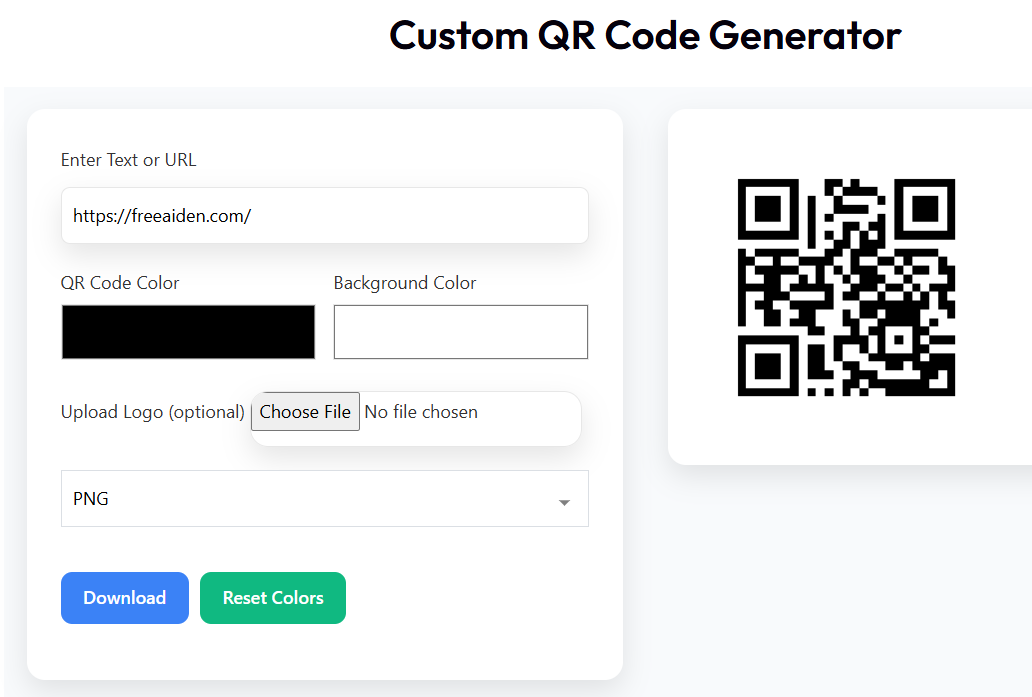
Creating a QR code with our tool is simple and takes less than a minute. Follow these easy steps:
- Enter Your Data: Type a URL, text message, email, phone number, or Wi-Fi credentials in the input box.
- Customize Appearance: Choose your QR code color, background color, and optionally upload your logo.
- Select Format: Download as PNG, JPEG, or PDF — perfect for printing or digital sharing.
- Generate & Download: Click "Generate" and then "Download" to save your QR code.
That's it! No sign-up, no email required. Your QR code is ready to use immediately.
Customization Options for QR Codes
One of the biggest advantages of our free QR code generator is the ability to customize your codes to match your brand or style.
Color Customization
You're not limited to black and white. Change the QR code color to match your logo or brand palette. Just make sure there's enough contrast between the code and background for reliable scanning.
Add Your Logo or Brand Image
Upload your company logo to the center of the QR code. Our tool automatically resizes and positions it to maintain scannability. This is perfect for business cards, product packaging, or marketing materials.
Background Options
Choose any background color, including transparent (PNG only), to fit your design needs. Avoid busy backgrounds that could interfere with scanning.
High-Resolution Export
Download in high resolution (256x256px or larger) to ensure clarity when printed. Our tool supports PNG (best for web), JPEG (smaller file size), and PDF (ideal for printing).
Unlike some free tools, we don't add watermarks or ads to your QR codes.
Benefits of QR Codes
QR codes are more than just a tech trend — they offer real benefits for individuals and businesses:
- Fast & Contactless: Share information instantly without physical contact — ideal for post-pandemic hygiene.
- Cost-Effective: Replace printed brochures, business cards, or flyers with a single scannable code.
- Versatile: Use for websites, social media, payments, Wi-Fi access, event tickets, and more.
- Trackable (with Dynamic Codes): Monitor how many people scan your code and when.
- Eco-Friendly: Reduce paper waste by going digital.
- Easy to Update (Dynamic): Change the destination without reprinting.
Whether you're a teacher sharing class resources, a restaurant owner updating your menu, or a marketer running a campaign, QR codes can save time and money.
Security Considerations for QR Codes
While QR codes are convenient, they can pose security risks if not used carefully.
Malicious QR Codes: Scammers can create codes that redirect to phishing sites or download malware. Always verify the destination before scanning unknown codes.
Privacy: Some QR code generators store your data or track scans. Our tool runs entirely in your browser — no data is sent to our servers. Your information stays private.
Best Practices:
- Preview the URL before scanning (some apps show the link first).
- Avoid scanning codes from untrusted sources.
- Use HTTPS links in your QR codes for secure connections.
- For sensitive data, consider using dynamic codes with password protection.
Our free QR code generator prioritizes your security by not collecting or storing any user data.
Real-Life Examples of QR Codes
QR codes are used in countless ways across industries. Here are three real-world examples:
1. Restaurant Menus
Instead of printing paper menus, restaurants use QR codes on tables that link to digital menus. This reduces costs, allows for easy updates, and supports contactless dining. During the pandemic, this became a standard practice worldwide.
2. Event Ticketing
Concerts, conferences, and festivals use QR codes as digital tickets. Attendees show the code on their phone, which is scanned at the entrance. It's faster, more secure, and reduces fraud.
3. Product Packaging
Brands add QR codes to product labels that link to videos, ingredient details, or recycling instructions. This enhances customer engagement and provides more value without increasing packaging size.
Other uses include Wi-Fi login sharing, digital business cards, museum exhibit info, and donation links.
Integration and Use Cases
QR codes can be integrated into almost any digital or physical system:
- Websites: Add a QR code to your homepage so visitors can save your site to their phone.
- Social Media: Share your Instagram or TikTok profile with a QR code in your bio or posts.
- Email Signatures: Include a QR code that links to your portfolio or calendar booking page.
- E-commerce: Add QR codes to order confirmations that link to tracking or return instructions.
- IoT Devices: Some smart devices use QR codes for quick setup and Wi-Fi pairing.
The possibilities are endless. With our free QR code generator, you can create codes for any integration need.
Our QR Code Generator Tool
Our tool is designed to be the most user-friendly, private, and powerful free QR code generator available.
Key Features:
- 100% Free: No hidden costs, no premium upgrades.
- No Registration: Start creating instantly — no email or account needed.
- Full Customization: Colors, logo upload, and format selection.
- High-Quality Output: Crisp, scannable codes in PNG, JPEG, or PDF.
- Privacy-First: All processing happens in your browser. We don't store your data.
- Mobile-Friendly: Works perfectly on smartphones and tablets.
Whether you need one QR code or dozens, our tool makes it easy.
Try It Now – Generate Your QR Code
Our easy-to-use interface allows you to enter any text or URL to see your QR code generated instantly.
Our Tool Compared to Others
There are many QR code generators online, but not all are created equal. Here's how we compare to popular alternatives like QRCode Monkey, GoQR, and QRStuff:
| Feature | Our Tool | QRCode Monkey | GoQR | QRStuff |
|---|---|---|---|---|
| Free to Use | ✅ Yes | ✅ Yes (basic) | ✅ Yes | ✅ Yes (basic) |
| No Registration Required | ✅ Yes | ✅ Yes | ✅ Yes | ❌ No |
| Logo Upload | ✅ Free | ✅ Premium only | ❌ No | ✅ Premium only |
| Custom Colors | ✅ Free | ✅ Premium only | ❌ No | ✅ Premium only |
| Data Privacy | ✅ No tracking | ⚠️ Some analytics | ✅ Good | ⚠️ Data collection |
| Download Formats | ✅ PNG, JPEG, PDF | ✅ Multiple | ✅ PNG | ✅ Multiple |
| Mobile Responsive | ✅ Yes | ✅ Yes | ✅ Yes | ⚠️ Limited |
As you can see, our free QR code generator offers premium features without the price tag. We believe powerful tools should be accessible to everyone.
Pricing and Plans
Here's the best part: our tool is 100% free. Forever.
No credit card, no trial period, no feature limitations. All customization options — including logo upload and color editing — are completely free.
We don't show ads, add watermarks, or upsell premium plans. Our goal is to provide a simple, reliable tool that anyone can use.
If you find the tool helpful, the best way to support us is by sharing it with others or bookmarking the page for future use.
Share Feedback
We love hearing from our users! Here's what some people are saying:
"I used this QR code generator for my café menu. It was so easy to add our logo and change the color to match our brand. Best of all — it's free!"
— Maria, Café Owner
"I needed a QR code for my student project. This tool worked perfectly on my phone and the code scanned every time."
— James, High School Student
Have a success story? Let us know how you're using QR codes!
Frequently Asked Questions (FAQs)
Can QR codes expire?
How do I scan a QR code?
What types of data can a QR code store?
Are QR codes safe to use?
Can I edit a QR code after downloading it?
Do I need an internet connection to scan a QR code?
Get Started Today
Ready to create your first QR code? It's fast, free, and takes less than a minute.
Whether you're promoting a website, sharing contact details, or going contactless at your business, our free QR code generator is the easiest way to get started.
No learning curve. No fees. Just results.
Summary
QR codes are a powerful, simple, and cost-effective way to share information in the digital age. From restaurants to classrooms, events to e-commerce, they bridge the gap between physical and digital worlds.
Our Free QR Code Generator makes it easy for anyone to create professional, customizable, and scannable QR codes — completely free and without compromising your privacy.
We've covered everything from the history of QR codes to real-world use cases, security tips, and how our tool compares to others. Now it's your turn to try it.
If you found this guide helpful, please share it with a friend or colleague who could use a free QR code tool. And don't forget to bookmark this page for future use!
Thank you for choosing our tool. Happy generating!
Watch here How To Generate QR code For Free
Other Free Ai Tools
Unlock the power of AI and simplify your everyday tasks. Whether you’re a creator, developer, or a curious mind — our collection of smart, free tools will save you time and boost your productivity.
Receipt Generator
Create professional receipts in seconds — customizable, printable, and ready to send.
Generate Now


