
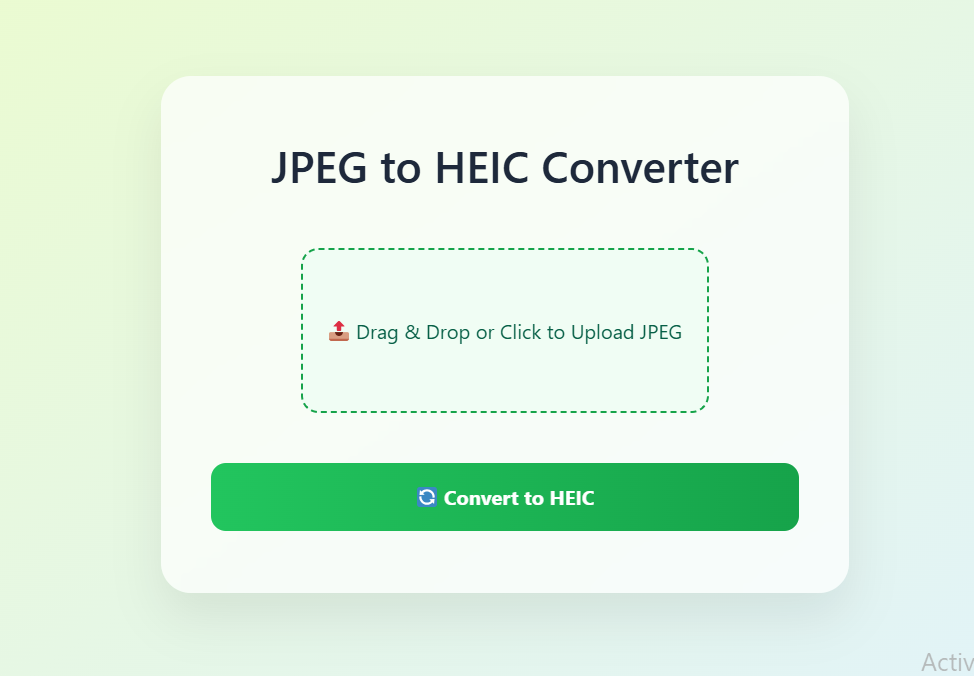
JPEG to HEIC Converter
Drop JPG files here or click to upload
Supports .jpg and .jpeg format only
Drag & Drop your JPEG files here
or
Converting files... Please wait
📤 Share the Free JPEG to HEIC Converter:
Free JPEG to HEIC Converter: Optimize Your Images for Modern Devices
In today's digital world, where we capture countless photos with our smartphones and cameras, managing storage space while maintaining image quality has become increasingly important. The Free JPEG to HEIC Converter offers a perfect solution to this challenge, allowing you to convert your JPEG images to the more efficient HEIC format with just a few clicks. This comprehensive guide will explore everything you need to know about JPEG and HEIC formats, why converting between them matters, and how our free online tool can help you optimize your image collection.
Understanding Image Formats: JPEG vs. HEIC
Before diving into the conversion process, it's essential to understand the fundamental differences between JPEG and HEIC formats. JPEG (Joint Photographic Experts Group) has been the standard image format for decades, widely supported across devices and platforms. However, HEIC (High Efficiency Image Container) represents the next generation of image compression technology, offering significant advantages in file size reduction without compromising quality.
What is JPEG Format?
JPEG is a lossy compression method specifically designed for photographic images. It works by discarding some image data that the human eye is less likely to notice, resulting in smaller file sizes. While this compression is effective, it can lead to artifacts and quality loss, especially at higher compression levels. Despite these limitations, JPEG remains incredibly popular due to its universal compatibility.
What is HEIC Format?
HEIC is a modern image format developed by the Moving Picture Experts Group (MPEG) that uses advanced compression algorithms based on HEVC (High Efficiency Video Coding). This format can store the same image quality as JPEG in approximately half the file size. Additionally, HEIC supports advanced features like storing multiple images in a single file, transparency, and 16-bit color depth, making it superior for modern photography needs.
Why Convert JPEG to HEIC?
Converting your JPEG images to HEIC format offers numerous benefits, particularly for users of Apple devices where HEIC has become the default image format. Here are the key advantages of making the switch:
Significant Storage Savings
HEIC files are typically 40-50% smaller than JPEG files of equivalent quality. This means you can store roughly twice as many photos in the same amount of space. For smartphone users with limited storage or photographers managing large image libraries, this reduction can be transformative.
Better Image Quality Preservation
Despite the smaller file sizes, HEIC maintains better image quality than JPEG at comparable compression levels. The advanced compression algorithms preserve more detail, especially in areas with subtle color gradients or fine textures.
Support for Advanced Features
HEIC format supports features that JPEG cannot, including transparency (alpha channels), 16-bit color depth, and the ability to store multiple images (like burst photos or Live Photos) in a single file. This makes HEIC more versatile for modern photography needs.
Future-Proofing Your Image Collection
As HEIC becomes increasingly supported across platforms and devices, converting your JPEG images to HEIC ensures your photo collection remains compatible with future technology. Apple already uses HEIC as its default format, and wider adoption is expected across the industry.
How Our Free JPEG to HEIC Converter Works
Our online converter tool has been designed with simplicity and efficiency in mind. You don't need technical expertise or specialized software to convert your images. The process involves just three simple steps:
- Upload Your JPEG Images: Drag and drop your JPEG files or click to browse and select images from your device. Our tool supports batch conversion, allowing you to process multiple images simultaneously.
- Automatic Conversion: Once uploaded, our tool automatically converts your JPEG files to HEIC format using advanced compression algorithms that optimize quality while reducing file size.
- Download Your HEIC Files: After conversion, you can download each HEIC file individually or as a ZIP archive for convenience. The converted files are ready to use on any HEIC-compatible device or application.
The entire process happens securely in your browser, with no need to upload sensitive images to external servers. Your privacy is protected, and files are processed quickly regardless of your internet connection speed.
Real-World Use Cases for JPEG to HEIC Conversion
Use Case 1: Smartphone Storage Optimization
With the ever-increasing resolution of smartphone cameras, photo libraries can quickly consume available storage. By converting existing JPEG photos to HEIC format, users can effectively double their available photo storage without deleting any memories. This is particularly valuable for iPhone users who want to maintain consistency with photos captured directly on their devices.
Example: Sarah has an iPhone with 64GB of storage. Her photo library of 5,000 JPEG images occupies approximately 15GB. After converting these images to HEIC, the same library uses only about 7.5GB, freeing up significant space for new photos and applications.
Use Case 2: Professional Photography Workflows
Photographers dealing with large volumes of images can benefit tremendously from HEIC's efficient compression. While RAW files remain essential for editing, delivering final images to clients in HEIC format reduces upload/download times and storage requirements without noticeable quality loss.
Example: A wedding photographer needs to deliver 800 final edited images to a client. Using JPEG, this collection would be approximately 2.4GB. By converting to HEIC, the file size reduces to about 1.2GB, making it easier for the client to download and store while maintaining professional image quality.
Use Case 3: Website and Application Optimization
Web developers and app creators can significantly improve loading times and reduce bandwidth usage by implementing HEIC images where supported. Our converter allows them to create HEIC versions of existing JPEG assets for modern browsers and devices that support the format.
Example: An e-commerce site with 1,000 product images averaging 200KB each in JPEG format could reduce its total image footprint from 200MB to approximately 100MB by implementing HEIC for compatible browsers, resulting in faster page loads and improved user experience.
Comparison: Free JPEG to HEIC Converter vs. Alternatives
While several tools exist for converting JPEG to HEIC, our free online converter offers distinct advantages that make it the preferred choice for most users. The following comparison highlights key differences between our tool and popular alternatives:
| Feature | Our Free JPEG to HEIC Converter | Desktop Software (e.g., iMazing HEIC Converter) | Other Online Converters | Manual Conversion (Command Line) |
|---|---|---|---|---|
| Cost | Completely Free | Often requires purchase or subscription | Free with limitations or watermarks | Free but technically complex |
| Ease of Use | Extremely simple drag-and-drop interface | Requires software installation and learning | Varies widely between services | Requires technical expertise |
| Processing Speed | Fast browser-based conversion | Depends on computer specifications | Limited by server queues and internet speed | Fast but setup time significant |
| Privacy & Security | Files processed locally in your browser | Files stay on your computer | Files uploaded to external servers | Complete control over files |
| Batch Processing | Unlimited batch conversion supported | Usually supports batch processing | Often limited without premium accounts | Possible with scripting knowledge |
| Platform Compatibility | Works on any device with a modern browser | Limited to specific operating systems | Browser-based but may have device restrictions | Platform-dependent command availability |
| Additional Features | Quality settings, batch download | Advanced editing capabilities | Varies significantly between services | Full control over conversion parameters |
As the comparison illustrates, our Free JPEG to HEIC Converter strikes an ideal balance between accessibility, functionality, and privacy. Unlike many online converters that upload your images to their servers, our tool processes everything locally in your browser, ensuring your photos remain private and secure.
Frequently Asked Questions (FAQ)
Is HEIC better than JPEG?
HEIC is generally superior to JPEG in terms of compression efficiency, offering similar quality at about half the file size. It also supports advanced features like transparency and storing multiple images in one file. However, JPEG maintains an advantage in universal compatibility, as it can be opened on virtually any device or software.
Can I view HEIC files on Windows computers?
Yes, but you may need to install additional codecs or use compatible software. Windows 10 and 11 have native HEIC support, but it might require a free extension from the Microsoft Store. Alternatively, many modern image viewers and editing applications now support HEIC format.
Will converting JPEG to HEIC reduce quality?
When using our converter with default settings, the quality reduction is minimal and often imperceptible to the human eye. HEIC's advanced compression algorithms are designed to preserve visual quality better than JPEG at equivalent file sizes. You can adjust quality settings if needed for specific use cases.
How many images can I convert at once?
Our free converter supports batch processing of unlimited images simultaneously. However, extremely large batches may take longer to process depending on your device's capabilities. For best performance, we recommend converting images in batches of 50-100 at a time.
Are there any file size limits?
Our tool can handle JPEG files of any size, but very large images (over 50MB) may take longer to process. There's no artificial limit imposed by our converter, but your device's memory and processing power will determine practical limits.
Is my privacy protected when using the converter?
Absolutely. Our JPEG to HEIC converter processes images entirely within your browser using JavaScript. Your files never leave your computer and are not uploaded to any server. This ensures complete privacy and security for your images.
Can I convert HEIC back to JPEG if needed?
Yes, we also offer a free HEIC to JPEG converter for situations where you need compatibility with devices or software that don't support HEIC format. The conversion process is equally simple and maintains image quality.
Technical Details: Understanding HEIC Compression
HEIC format utilizes the HEVC (H.265) video compression standard adapted for still images. This represents a significant advancement over JPEG's DCT (Discrete Cosine Transform) compression. The key technical improvements include:
- Improved Prediction Algorithms: HEVC uses more sophisticated prediction methods to reduce redundant information
- Larger Block Sizes: While JPEG uses 8x8 pixel blocks, HEIC can use blocks up to 64x64 pixels, allowing for more efficient compression of large uniform areas
- Advanced Transform Techniques: HEIC employs more efficient transform methods that better preserve image details
- Better Entropy Coding: The CABAC (Context-Adaptive Binary Arithmetic Coding) used in HEIC is more efficient than JPEG's Huffman coding
These technical advancements translate to practical benefits for users, with file size reductions of 40-50% compared to JPEG at equivalent quality settings. The format also supports 16-bit color depth (compared to JPEG's 8-bit), allowing for better representation of color gradients and reduced banding artifacts.
Tips for Optimal JPEG to HEIC Conversion
To get the best results from our converter, consider these expert tips:
- Start with High-Quality JPEGs: The conversion works best when your source JPEGs have minimal compression artifacts. If possible, use JPEGs saved at quality settings of 80% or higher.
- Consider Your Audience: If you're converting images for sharing, ensure the recipients can view HEIC files. For maximum compatibility, you might need to provide JPEG versions as well.
- Test Different Quality Settings: Our converter allows you to adjust the compression level. For archival purposes, use higher quality settings. For web use, slightly more aggressive compression may be acceptable.
- Organize Before Converting: Since our tool supports batch processing, organize your images into logical groups before conversion to streamline your workflow.
- Keep Originals: Always maintain backup copies of your original JPEG files before conversion, especially for important images.
The Future of Image Formats
HEIC represents an important step in the evolution of image formats, but it's not the final destination. New formats like AVIF (AV1 Image File Format) promise even greater compression efficiency. However, HEIC has established a strong foothold, particularly in the Apple ecosystem, and will likely remain relevant for years to come.
As technology advances, we can expect continued improvements in image compression algorithms. What won't change is the need for tools that make these advancements accessible to everyday users. Our Free JPEG to HEIC Converter is designed to bridge the gap between technical innovation and practical usability.
Conclusion: Optimize Your Images with Our Free Converter
Converting your JPEG images to HEIC format is a smart strategy for anyone looking to save storage space while maintaining image quality. Our Free JPEG to HEIC Converter makes this process simple, secure, and accessible to everyone, regardless of technical expertise. With no registration required, unlimited conversions, and local processing that protects your privacy, there's no reason not to start optimizing your image collection today.
We hope this comprehensive guide has been helpful in understanding the benefits of HEIC format and how our converter can work for you. If you found this information valuable, please consider sharing it with others who might benefit from optimizing their image storage. Bookmark this page for future reference, and check back regularly as we continue to improve our tools and add new features.


