

How to Detect Watermarks and Remove Them in Claude AI Generated Text
Have you ever copied text from Claude AI and felt like something was invisible hiding in the content? You're not alone. Since 2026, Anthropic has quietly introduced watermarking in Claude AI generated text to comply with new European Union regulations. For content creators, students, marketers, and developers, these hidden watermarks can cause serious problems - from plagiarism flags to SEO penalties.
In this comprehensive guide, I'll show you when Claude watermarks were introduced, why EU laws forced this change, how the watermarking technology actually works, and - most importantly - how to detect and remove Claude watermarks for free using a simple online tool.
If you want the short answer: Freeaiden AI Watermark Remover is a free tool that detects hidden Unicode watermarks in Claude AI text and removes them with one click. Watch this video tutorial to see exactly how it works.
When Was Claude Watermarking Introduced?
Anthropic, the company behind Claude AI, officially began rolling out text watermarking across its Claude models in early 2026. The feature was first tested in beta during late 2025, but became the default for most Claude-generated outputs by mid-2026. This move came after Anthropic announced its commitment to the EU AI Act's transparency requirements, which mandate that AI-generated content be identifiable.
The watermarking system is designed to be non-intrusive - you won't see a visible badge or marker on the text. Instead, Claude embeds a hidden statistical pattern or invisible Unicode characters into the output. The goal is to allow regulators, educators, and content platforms to verify whether a piece of text was AI-generated.
But for everyday users, this has created an unexpected headache. If you use Claude AI to write articles, essays, or marketing copy, those hidden watermarks can travel with the text into your final documents, websites, or submissions. Some plagiarism checkers and AI detectors now look for these exact watermarks, which can unfairly flag your work.
Why EU Laws Forced the Change
The European Union Artificial Intelligence Act (EU AI Act) is the world's first comprehensive legal framework for AI. One of its core requirements is transparency - specifically, AI systems that generate text must include a way to mark that content as machine-generated. The law aims to:
- Combat misinformation: Make it easier to identify AI-generated news, reviews, and social media posts.
- Protect consumers: Help people know when they are interacting with AI-generated content.
- Ensure accountability: Allow platforms and regulators to trace AI-generated text back to its source.
Claude AI, like other major AI platforms, had to comply with these regulations to continue operating in the European market. Rather than adding a visible "AI-generated" label, Anthropic chose to embed an invisible watermark that doesn't disturb the reading experience but can be detected using the right tools.
Unfortunately, this means if you're using Claude AI for legitimate content creation, you might inadvertently carry these watermarks into your published work. That's why knowing how to detect and remove them is now an essential skill for anyone who works with AI-generated text.
How Claude Watermarks Work
Claude's watermarking system is sophisticated but not impossible to understand. It generally works in two ways:
1. Statistical Token Watermarking
Claude's language model selects words (tokens) based on probability. When watermarking is active, the model slightly shifts its token selection toward a specific pattern. For example, it might prefer certain synonyms, grammatical structures, or word sequences that carry a hidden signal. This pattern is mathematically detectable but invisible to a human reader. If you have the right decoder, you can verify that the text came from Claude.
2. Invisible Unicode Watermarking
In some implementations, Claude also injects zero-width characters, word joiners, or variation selectors into the text. These are Unicode characters that have no visual width or display, but they are still part of the text string. For example, a zero-width space (U+200B) can be inserted between words without changing how the text looks. When you copy and paste the text, those invisible characters come with it.
These hidden Unicode characters can cause issues in code, forms, databases, and even SEO tools. Google and other search engines can sometimes interpret them as unusual characters, which may affect how your page is indexed or rendered.
Why You Should Detect and Remove AI Watermarks
There are several practical reasons to remove Claude AI watermarks from your text:
- Avoid AI detection flags: Many AI content detectors now look for watermark patterns. Removing them can help your content pass as human-written (if that is your goal).
- Protect your SEO: Invisible Unicode characters can confuse search engine crawlers, leading to indexing issues or strange characters in search snippets.
- Clean code and data: If you use Claude to generate code, JSON, or CSV files, hidden characters can break syntax or cause errors.
- Professional integrity: If you're submitting work to a client or academic institution, you don't want hidden watermarks that could raise questions about originality.
- Privacy and control: You should have full control over the content you create, including the invisible metadata embedded in it.
Removing watermarks does not alter the visible text. It only deletes the hidden markers. This is completely legal and often necessary for practical content management.
The Free Solution: Freeaiden AI Watermark Remover
After testing multiple tools, I found that Freeaiden.com offers the most straightforward and effective free solution for detecting and removing Claude AI watermarks. The tool is specifically designed to handle the invisible Unicode patterns used by Claude and other LLMs.
Try Freeaiden AI Watermark Remover Now
The tool works entirely in your browser, requires no sign-up, and is completely free. It can detect both statistical watermarks and invisible Unicode characters. You can paste any text from Claude AI, ChatGPT, Gemini, or any other LLM, and it will analyze the content for hidden markers.
For a visual walkthrough, 📺 Watch this video tutorial
Step-by-Step: How to Detect and Remove Claude Watermarks
Follow these simple steps to clean your Claude AI generated text. I've included screenshots so you can follow along easily.
Step 1: Go to Freeaiden.com
Open your browser and navigate to https://freeaiden.com/ai-watermark-remover/. The homepage of the Freeaiden watermark remover will load, showing you a clean interface with several AI tools.

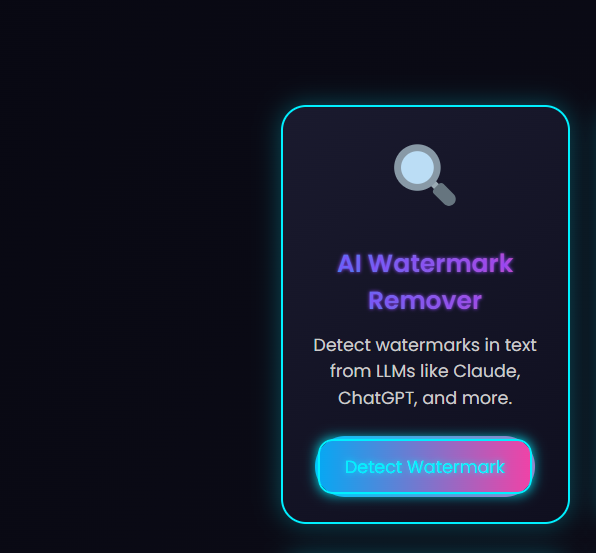
Step 2: Click the First Tool - AI Watermark Remover
On the Freeaiden homepage, locate the AI Watermark Remover tool. It is typically the first tool listed under the "AI Text Tools" section. Click on it to open the watermark detection and removal interface.
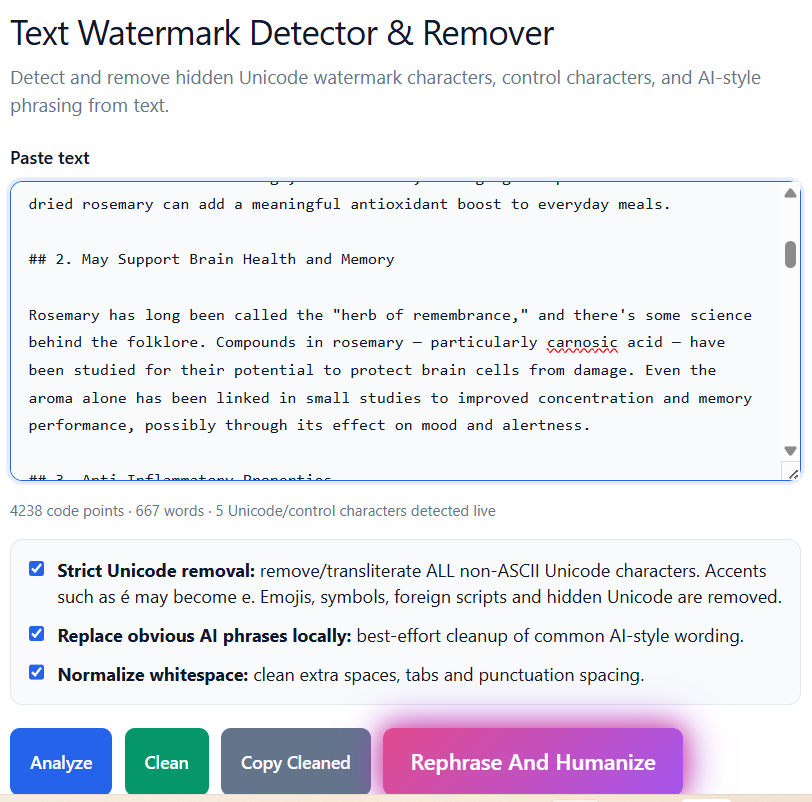
Step 3: Paste Your Claude AI Text and Click Analyze
Open the document or text file that contains your Claude AI generated content. Copy the entire text (or the portion you want to check) and paste it into the large text field on the Freeaiden tool. Once you've pasted the text, click the Analyze button.
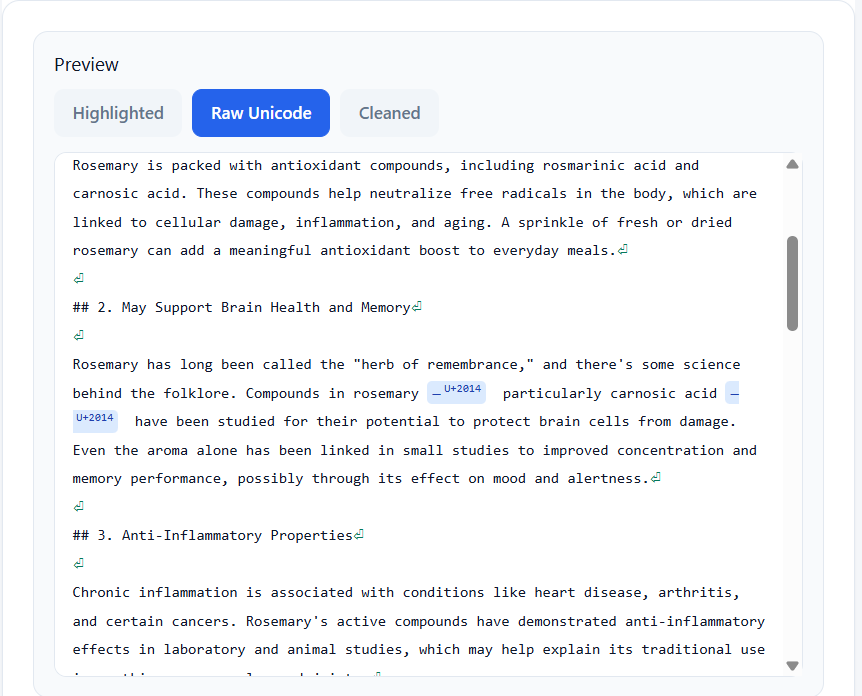
Step 4: View Results - Click Raw Unicode
The tool will immediately analyze your text and display results. If any watermarks are detected, you'll see a summary of the hidden characters. To see the exact invisible Unicode characters, click the Raw Unicode button. This will show you all the zero-width spaces, variation selectors, and other hidden markers embedded in your text.
Step 5: Clean the Watermark - Get Content Without Watermark
Once you've reviewed the raw Unicode results, simply click the Clean button. The tool will automatically remove all detected watermark characters from your text. You will then see a clean version of your content - exactly the same words, punctuation, and formatting, but without any hidden watermarks. You can now copy the cleaned text and use it confidently in your projects.
Note: The Clean function removes all invisible Unicode characters, including those that may have been introduced by Claude AI's watermarking system.
Tips for Best Results
- Always scan full documents: Watermarks can be scattered throughout long texts. Paste the entire document to ensure complete removal.
- Use the tool before publishing: Make it a habit to run your AI-generated content through Freeaiden before uploading to WordPress, Google Docs, or any content management system.
- Check multiple times: Sometimes you may need to run the tool twice if you've edited the text after the first cleaning, as new hidden characters can be introduced by certain text editors.
- Keep a clean copy: Save the cleaned version as a separate file so you always have a watermark-free backup.
- Use for all LLM outputs: While this guide focuses on Claude AI, the Freeaiden tool also works for ChatGPT, Gemini, and other LLM outputs that may use similar watermarking methods.
Frequently Asked Questions
What is a Claude AI watermark?
A Claude AI watermark is a hidden pattern or invisible Unicode character inserted into text generated by Claude AI. It helps identify the text as machine-generated without changing the visible content.
Why did Claude AI add watermarks?
Claude AI added watermarks to comply with the EU AI Act and similar transparency regulations. These laws require AI systems to make machine-generated content detectable to reduce misinformation and improve accountability.
Can I remove Claude AI watermarks for free?
Yes, you can remove Claude AI watermarks for free using the Freeaiden AI Watermark Remover tool. It detects invisible Unicode characters and cleans the text with one click.
Does removing the watermark change my text?
No, removing the watermark only deletes the hidden Unicode characters or markers. The visible words, punctuation, and formatting remain exactly the same.
Is it legal to remove AI watermarks?
Removing watermarks from your own AI-generated text is generally legal. However, using AI-generated content to deceive others (e.g., passing it off as human-written for fraudulent purposes) may violate platform policies or academic integrity rules. Always use AI responsibly.
Conclusion
Claude AI watermarks are the new reality for anyone using AI-generated text. Introduced to comply with EU laws, these invisible markers can cause hidden problems in your content. But you don't have to let them ruin your work. With the Freeaiden AI Watermark Remover, you can detect and remove Claude watermarks in seconds - completely free.
I recommend bookmarking the tool and using it every time you generate text with Claude, ChatGPT, or any other LLM. It's a small step that can save you from big headaches down the road. If you found this guide helpful, share it with your friends and colleagues who use AI writing tools.


